Introducing Hegemi: Digital Twin Inventory Management for Complex Assemblies
Discover how Hegemi's digital twin approach to inventory management provides unparalleled visibility and control over complex manufacturing processes, from component sourcing to final delivery.
Introducing Hegemi: Digital Twin Inventory Management for Complex Assemblies
Hegemi is inventory management software for companies that build complex assemblies. It creates a digital twin of every serialized unit you manufacture, with complete event history tracking down to the individual component level.
The Core Idea: A Living Record
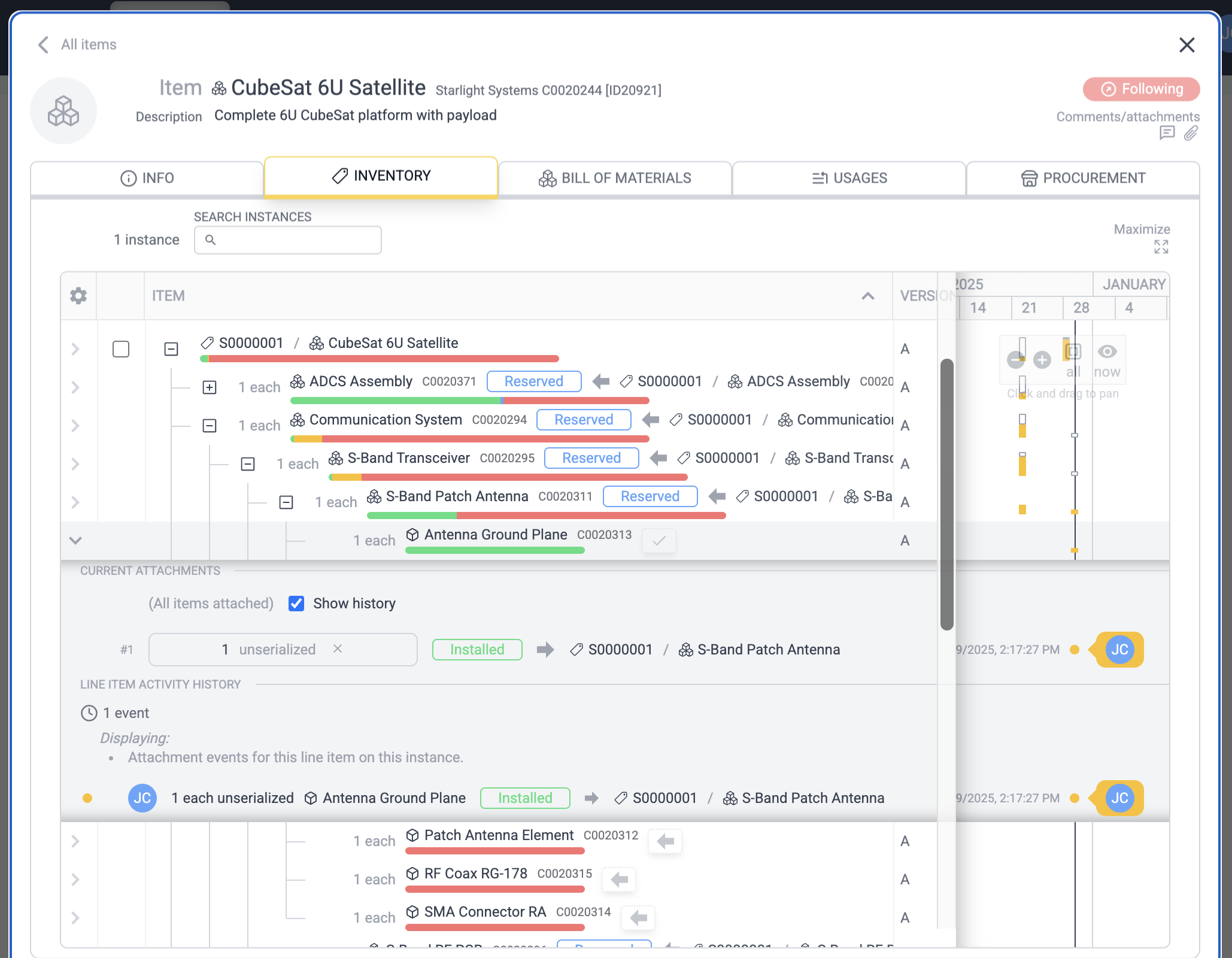
Every line item on every sub-assembly retains its full history: when parts were attached, detached, swapped between units, and issues opened and resolved—all timestamped and attributed to specific users. This isn't just a database of what you have. It's a living record of what happened, when, and by whom.
When you expand any instance, you see:
- The hierarchical BOM structure with completion status bars
- Gantt-style activity histograms showing when work occurred
- Full event history for every component attachment and swap
This level of detail makes it possible to:
- Know the exact build state of every unit in your fleet
- Track components that move between parent assemblies over their lifetime
- Audit who did what and when, for quality and compliance
- See at a glance where work is actively happening across your organization
Activity Histograms
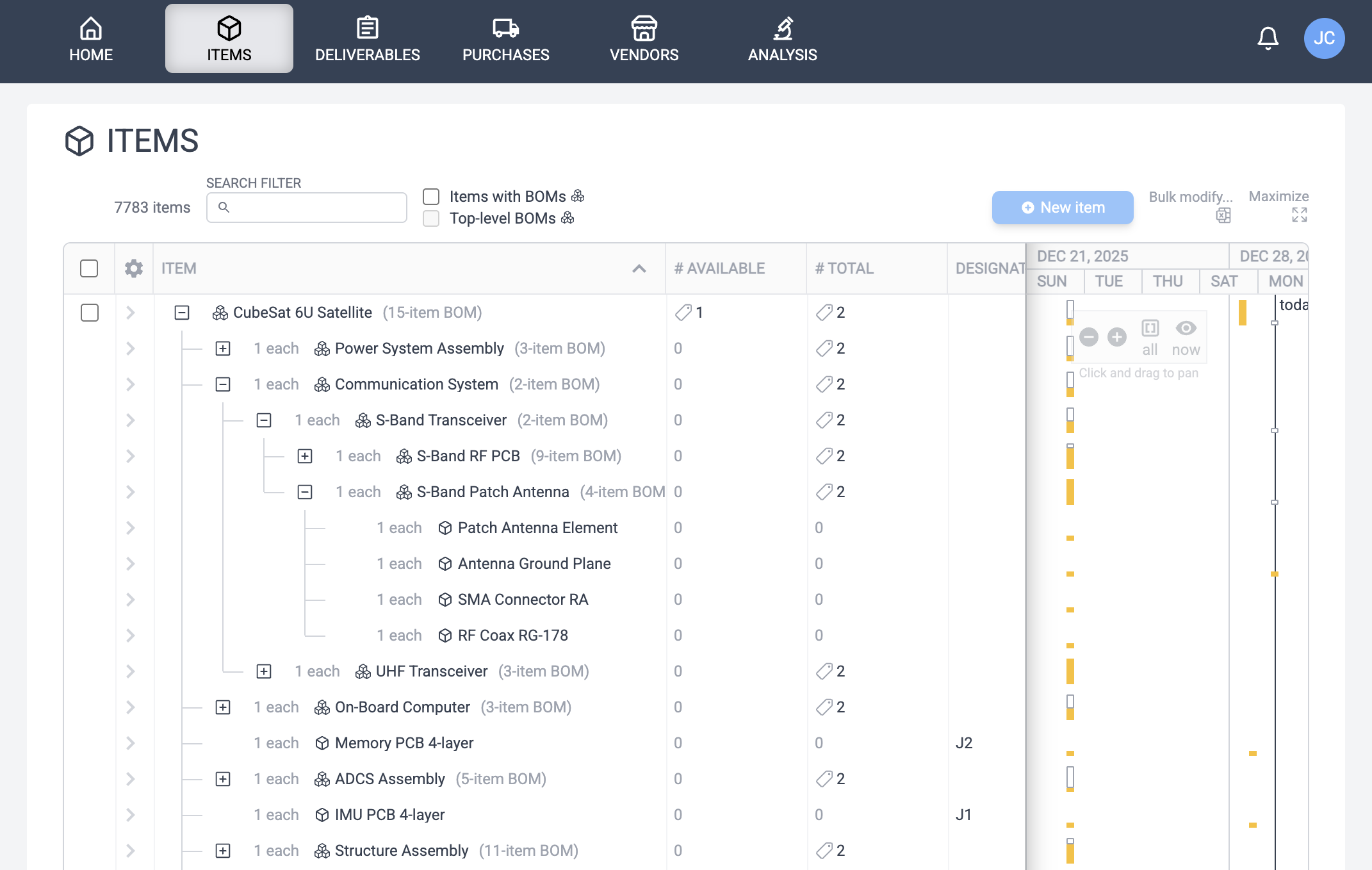
Throughout Hegemi, every table displays Activity Histograms alongside its rows—compact Gantt-style visualizations showing when events occurred on each entity. This provides instant insight into what's actively being worked on, what's been idle, and patterns over time.
Core Concepts in Hegemi
Items and Bills of Materials (BOMs)
An Item defines a type of product, component, or material. It's the template. A Bill of Materials (BOM), in turn, defines the components required to assemble one unit of that Item. Hegemi supports hierarchical BOMs, where a parent item's BOM can include sub-assembly items that have their own BOMs.
BOMs also support Revisions. When you need to update a BOM, you can create a new revision, preserving the history of existing builds while allowing new ones to use the updated structure.
Instances: The Digital Twin
While an Item is the template, an Instance represents a specific, traceable, serialized occurrence of that Item. This is the core of the digital twin concept. When a product is assembled, each unit is an instance that tracks:
- Which specific components were installed.
- When they were installed, and by whom.
- The full attachment history if parts were ever swapped out.
For items with a BOM, the Instance BOM Tab is the heart of tracking. Each line item shows a completion bar indicating its status: Installed (Green), Reserved (Blue), Available (Amber), or Missing (Red).
Purchases
A Purchase Order (PO) represents a formal request to procure items from an external vendor. In Hegemi, purchases are designed to document parts needed, route through an optional approval workflow, and automatically increment inventory upon receipt.
You can create purchases manually or generate them automatically using Inventory Analysis.
Deliverables: Fulfilling Customer Orders
A Deliverable represents a customer order or project commitment. It specifies the final products to be delivered, tracks their assembly status, and aggregates the costs spent to fulfill the order. It's the container that groups together everything you need to ship to a customer.
For assembled products, you associate specific instances (serial numbers) with the deliverable. The deliverable's completion status rolls up the progress of all associated instances, giving you an at-a-glance view of how close the order is to being ready.
Powerful Planning & Management Tools
Inventory Analysis
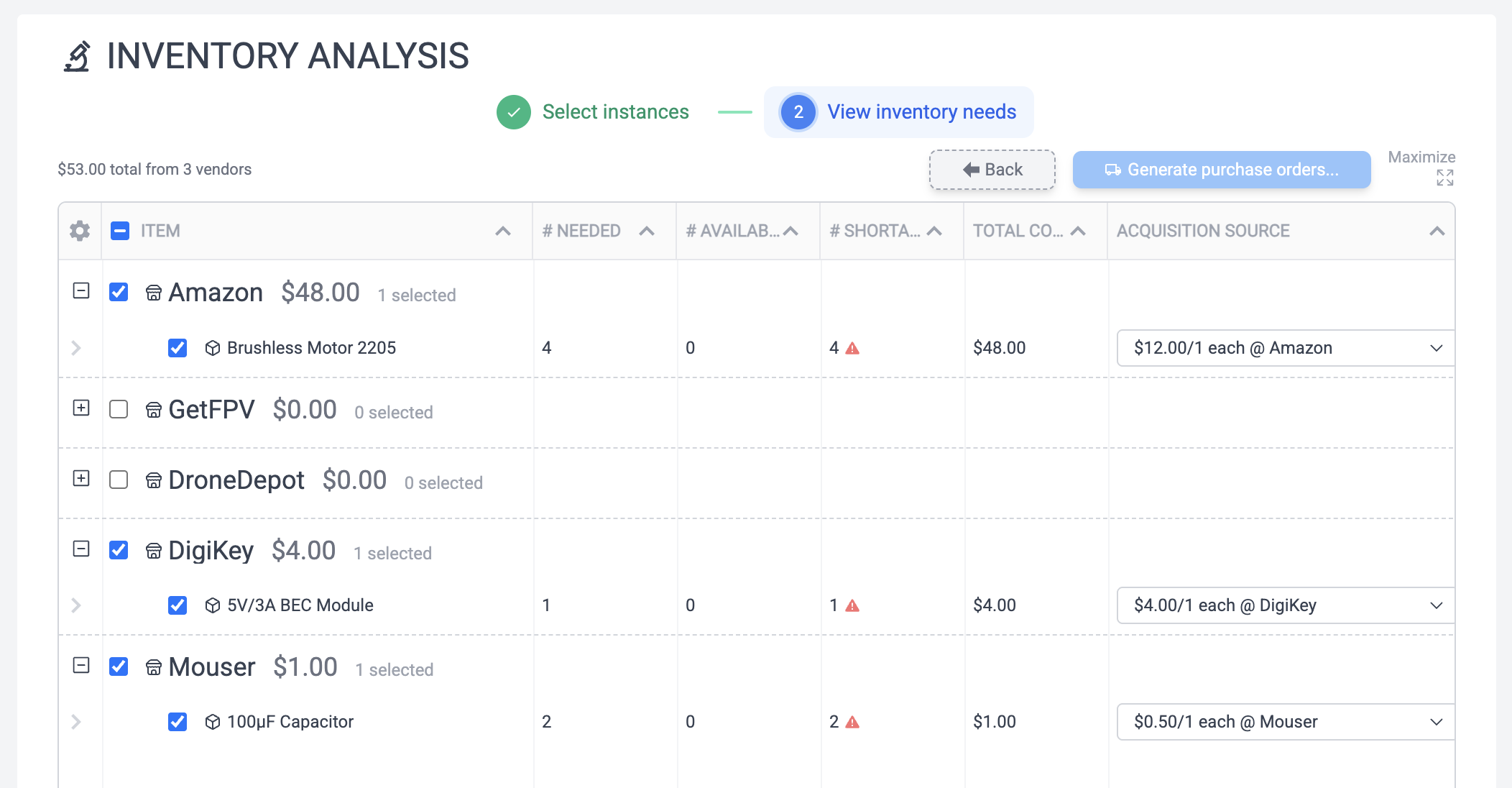
Inventory Analysis (IA) answers the question: "Do I have enough parts to build this?" It allows you to simulate building one or more instances and checks your inventory levels to determine exactly what parts are missing. From there, you can automatically generate Purchase Orders for any shortages.
Bulk Modify
Hegemi's bulk import feature allows you to create, modify, or delete large numbers of items, BOMs, and vendor items at once using a spreadsheet. This is invaluable for initial data migration, mass updates to pricing or descriptions, and cleanup of obsolete items.
Comprehensive Features
- For Managers: Get visibility into build progress, fleet status, and a summary of all company activity.
- For Engineers: Define hierarchical BOMs and maintain a rich documentation history with notes and attachments.
- For Technicians: A virtual space to mirror the physical build, creating a detailed as-built record for every instance.
- For Accounting: Easily determine parts costs, generate purchase orders, track procurement against customer orders, and manage vendor history.
Getting Started with Hegemi
A typical workflow looks like this:
- Define Items and BOMs: Use the UI or the powerful bulk import to define your products and their components.
- Create Instances: Instantiate your BOMs to begin a new build, which recursively creates and reserves all sub-assemblies with unique serial numbers.
- Create a Deliverable: Group the instances for a specific customer order.
- Perform Inventory Analysis: Identify and order any missing parts by generating purchase orders.
- Build the Instances: Virtually assemble the digital twin as the physical product is built, creating a granular, timestamped history of every action.
With its focus on creating a true digital twin and providing unparalleled visibility through an intuitive interface, Hegemi transforms how companies manage the production of complex assemblies.