Overview
Hegemi is inventory management software for companies that build complex assemblies. It creates a digital twin of every serialized unit you manufacture, with complete event history tracking down to the individual component level.
The Core Idea
Every line item on every sub-assembly retains its full history: when parts were attached, detached, swapped between units, issues opened and resolved—all timestamped and attributed to specific users.
This isn't just a database of what you have. It's a living record of what happened, when, and by whom.
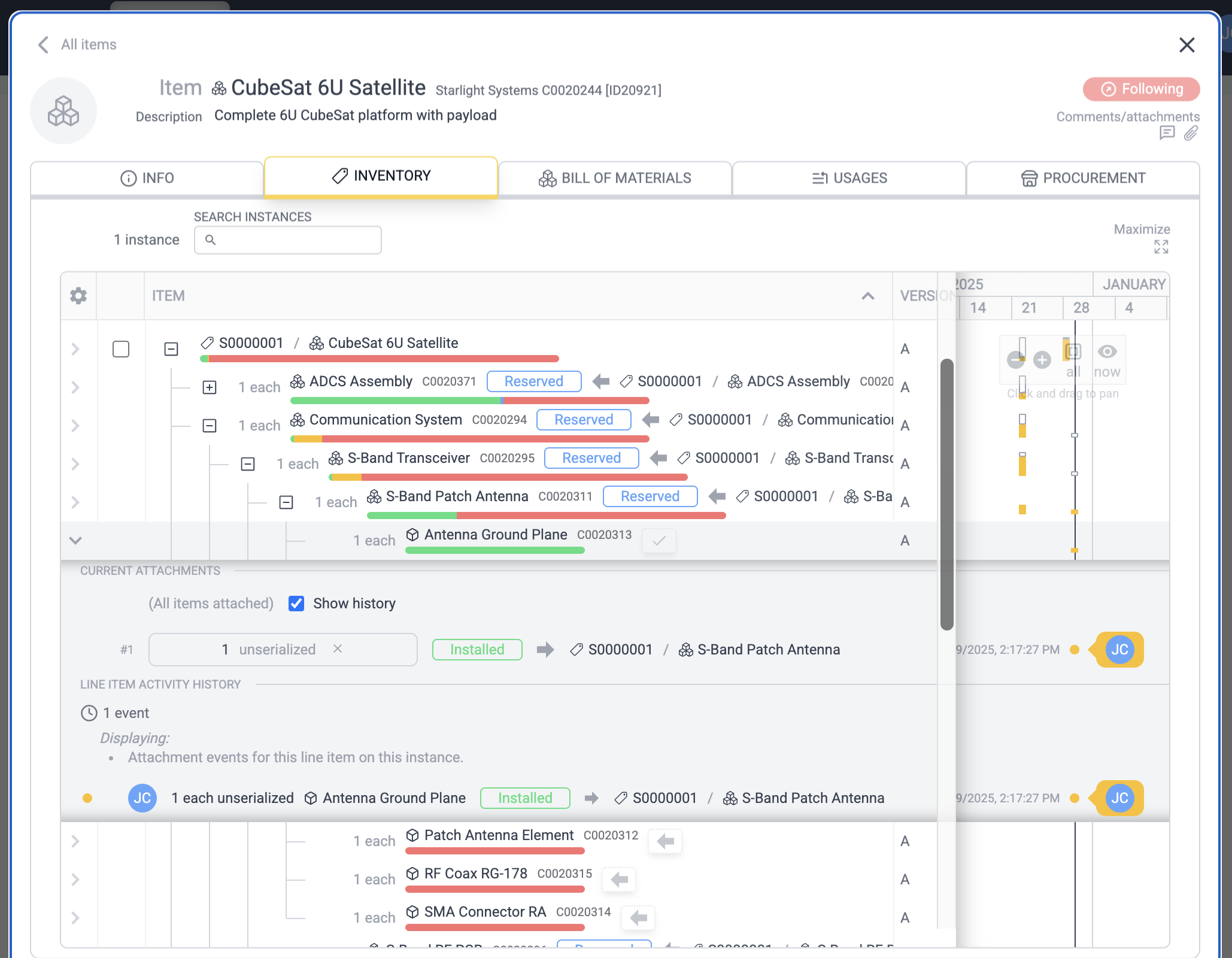
When you expand any instance, you see:
- The hierarchical BOM structure with completion status bars
- Gantt-style activity histograms showing when work occurred
- Full event history for every component attachment and swap
This level of detail makes it possible to:
- Know the exact build state of every unit in your fleet
- Track components that move between parent assemblies over their lifetime
- Audit who did what and when, for quality and compliance
- See at a glance where work is actively happening across your organization
Why Not Excel?
A component/assembly contains a bill of materials (BOM) - a table of part references. BOMs for many manufacturing companies thus naturally begin in Excel. However you quickly run into issues trying to do the above in Excel:
- Hierarchy requires multiple tables/worksheets for each subassembly.
- Tracking instances of this BOM with line item granularity is not trivial.
Techniques, none perfect:
- Complete copy of every BOM worksheet for the instance (redundant)
- Mirror of BOM worksheets with ID references (fragile)
- Extra columns on the BOM for instances (doesn't scale)
- Etc
- Item definitions are typically copied for each reference, not shared/linked.
- Tracking attachment history on a per-line item granularity is difficult
- Who assigned what and when? Was this the only time something was attached here? Was it ever detached and moved? Etc.
- Vendor items get complicated when there are more than one option (how should you denote that you can buy those screws in both a 10-pack or a 500-pack?)
- Multiple BOM versions? File management gets out of hand
Hegemi solves all of these problems and many more, such as:
- Providing a repository for notes and comments on items, instances, vendor items, etc
- Visualizing activity on items, instances, etc, as histograms on a Gantt chart
- Inventory shortage calculations that can take into account the parts
currently attached to complex, partially-built hierarchical instances of BOMs
- Auto-generated purchase orders from shortages
- Purchase order user approval flows
- Etc (see full list)
How to use Hegemi
The problem at a high level: you have a complex product that you want to build instances of to fulfill orders to customers. Let's say you have two models of drone, A and B. They're expensive, maybe even partly bespoke. Somebody puts in an order for three of drone A and one B. Here are some ways Hegemi helps this process:
- Define your items and BOMs
Items can be defined through the UI, but the fastest way is probably to use bulk import.
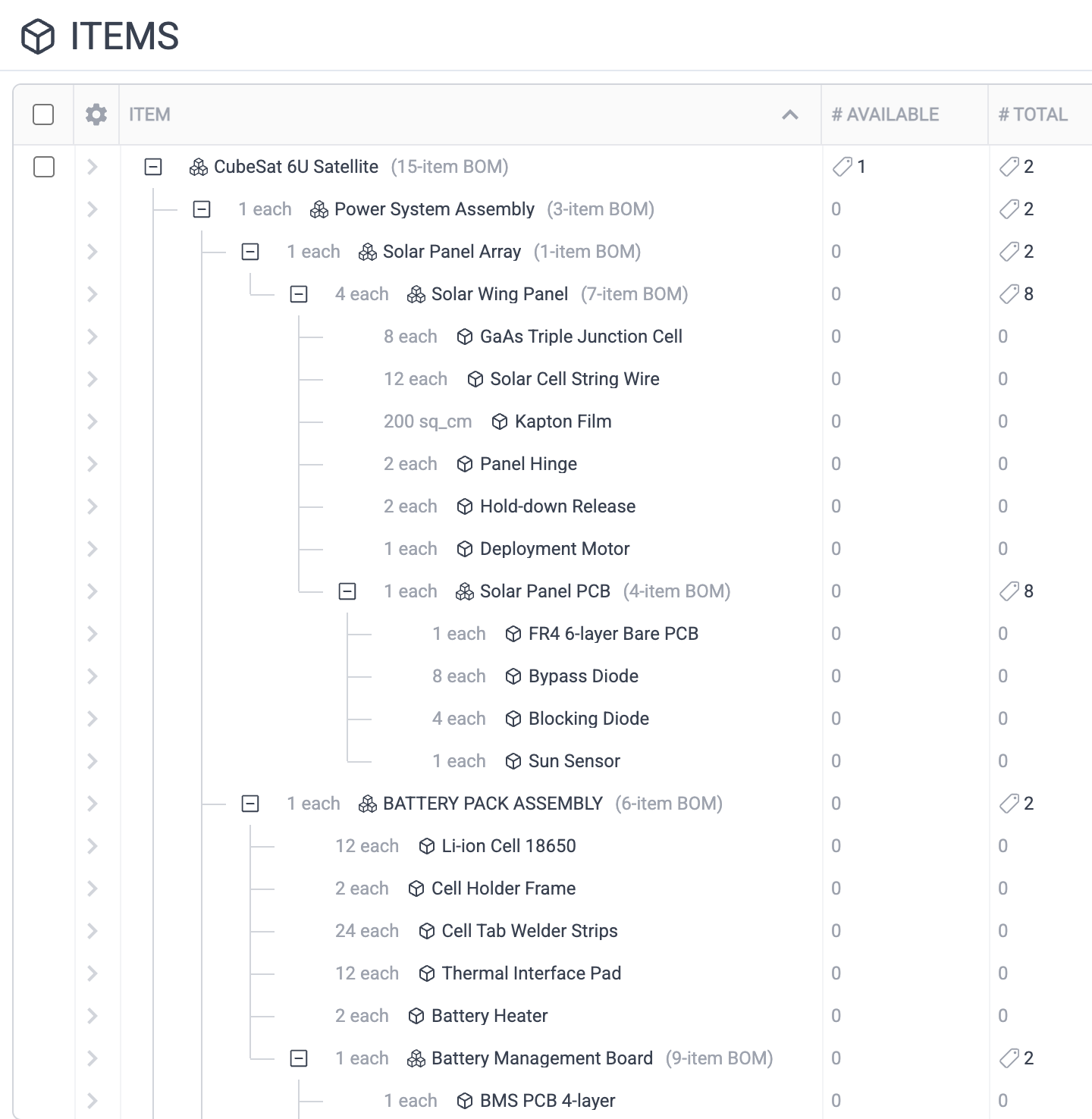
- Create one or more instances
Note this will recursively instantiate and reserve all sub-assemblies with unique serial numbers.
- Create a deliverable
Instances are often made to order for a particular customer. Deliverables define such orders and help group together the instances for the order by associating specific instances with it.
- Perform inventory analysis
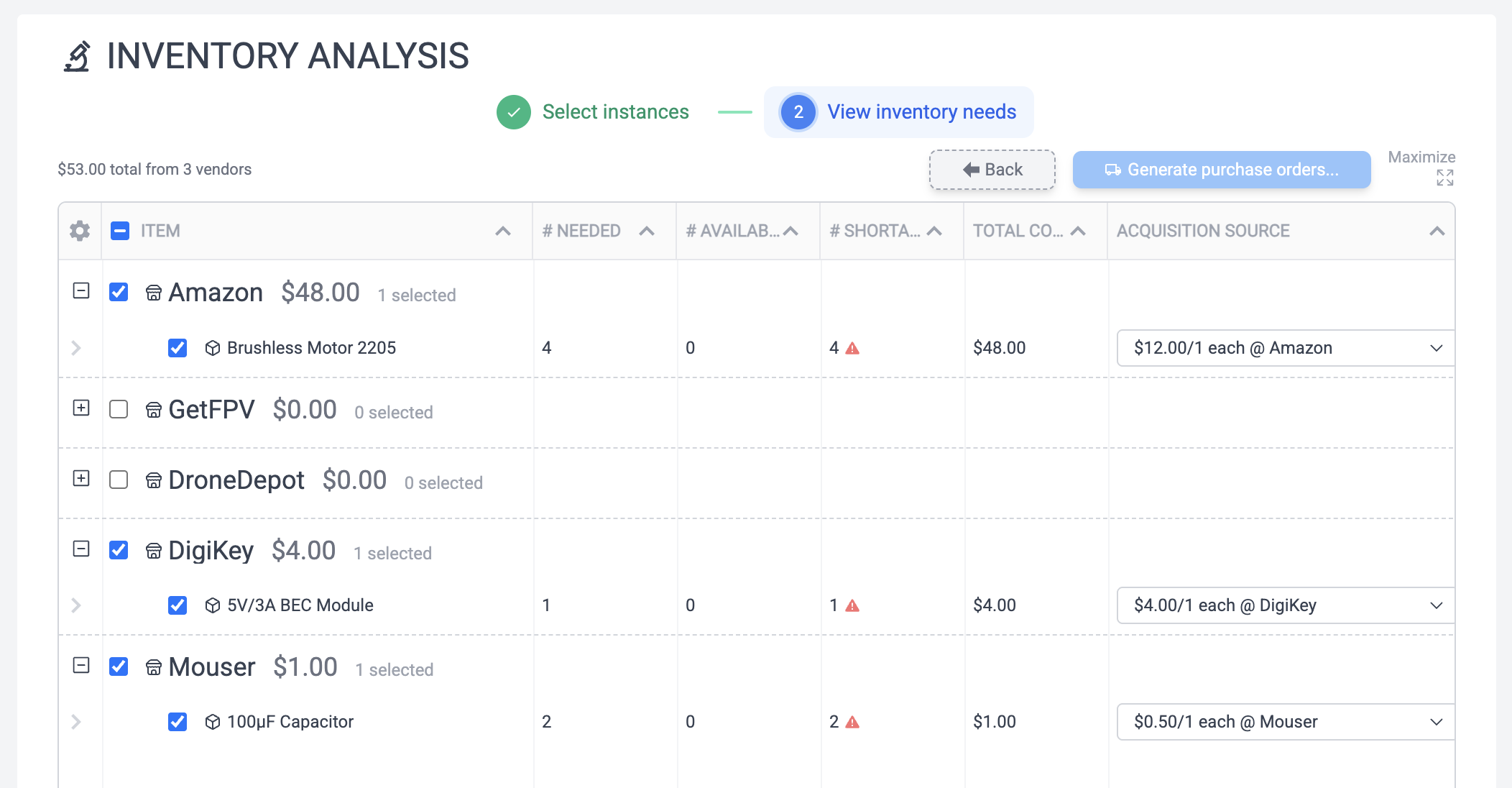
Each item in your database has available quantities in inventory (both serialized and unserialized). Inventory Analysis takes into account available stock to, based on the vendor item information you provide, produce purchase orders for missing inventory.
This doesn't commit you to anything. This process can be done repeatedly. Subassemblies can be selectively excluded, purchase recommendations can be ignored, existing part attachments to the instance can be factored in, etc.
- Make purchases for inventory shortages
These purchases can optionally require approvals from e.g. the Deliverable owner, they can be exported to PDF, etc. Once they are marked as arrived, inventory for those items can be auto-incremented.
- Build the instances
Virtually "build" this digital twin, line item by line item, at the same time the real item is being built, in order to provide a record. This then shows up in the Gantt histogram and event history for the instance to provide granular tracking of builds. Suddenly the whole enterprise knows exactly the status of every build.
You can also now monitor the completion of all instances on the deliverable at a glance through its "bom completion graph", representing how many individual items of the total are attached, reserved, available, etc. See instances for more details.
- Make changes
You may realize halfway through the build that you need to modify a BOM. That's fine, just create a new BOM revision and migrate the affected instances to use that revision. The original revision is still retained, along with any instances that make use of it, even after other instances have migrated.
Or, the customer might send the instance back after delivery with a broken subcomponent. If you then swap a part, this is captured along with by who and when. A repair order can optionally be created to document this and notify appropriate people.
Activity Histograms
Throughout Hegemi, every table displays Activity Histograms alongside its rows—compact Gantt-style visualizations showing when events occurred on each entity.
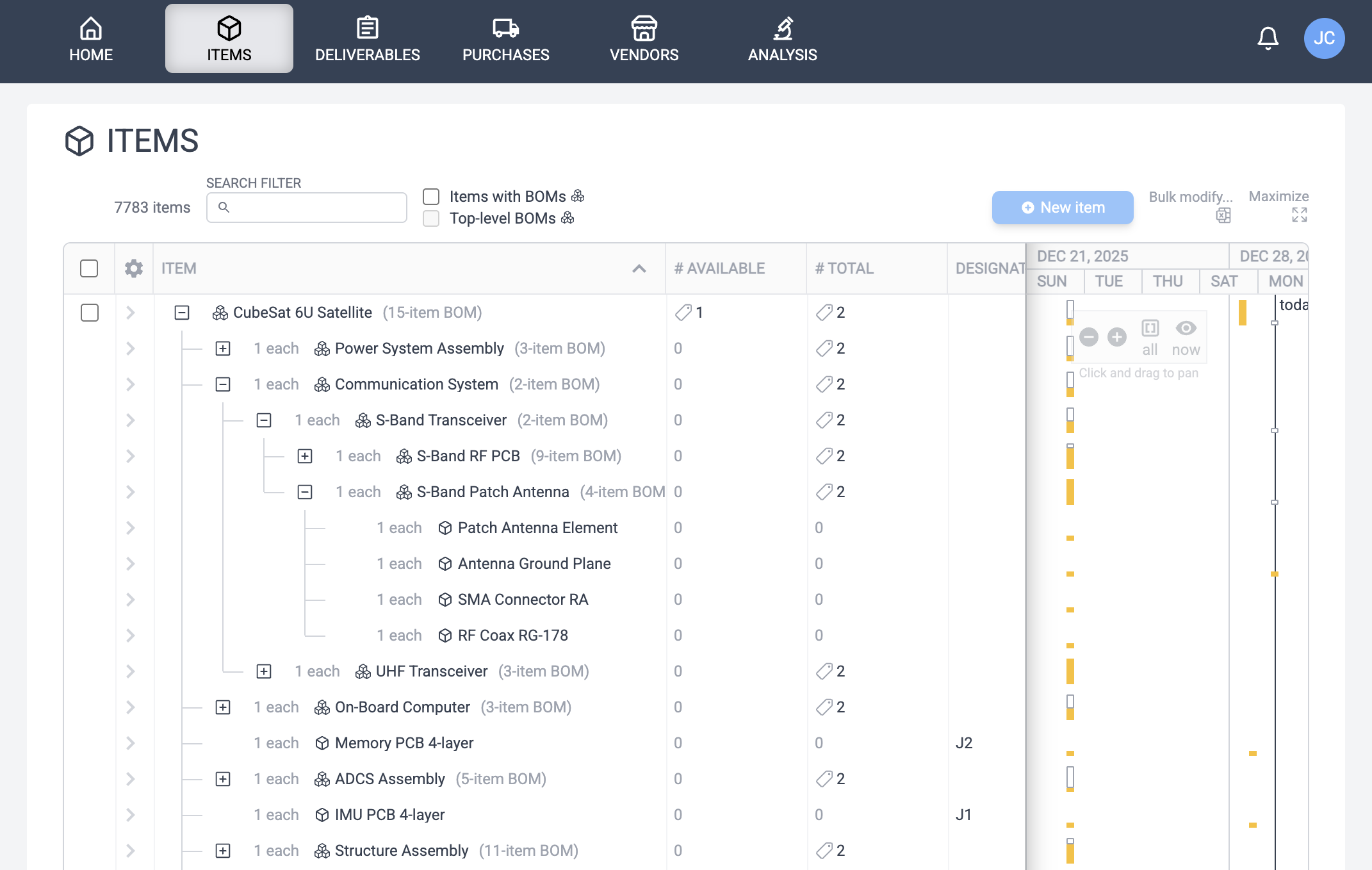
In the screenshot above, notice the right half of the table: amber bars indicate when activity occurred on each item. Click on the row to expand the event detail to view the specific events.
This visualization provides instant insight into:
- What's actively being worked on: Recent bars show where work is happening right now.
- What's been idle: Gaps might indicate a stalled build or stable unit.
- Patterns over time: Bursts of activity during build phases, quiet periods during storage.
The bars are color-coded:
- Amber (solid): Direct events on this entity
- Amber (hollow): Descendant events (activity on child components within a BOM hierarchy)
Activity histograms appear throughout Hegemi --- in Items, Instances, Purchases, Deliverables, Vendors, and within the Instance BOM editor showing activity on child components.
What's next
Check out an example BOM to try this for yourself. Hegemi's free tier should be enough to start using this software, play around with it using your own data, even use it for free as long as you want until you run up against the limits.